



QQPoker Account Entry Through App, Desktop Client and Web Browser
Login QQPoker works across four setups: Android and iOS apps, Windows and macOS desktop builds, plus a browser path that skips installation entirely. Every method ties back to one profile, so chips, tournament seats, and history do not reset when you jump between devices.
| Access Method | Where to Get It | Install Required | Key Advantage |
| Android app | Android version on the official download page | Yes | Portrait and landscape support |
| iOS app | iOS version on the official download page | Yes | Optimized for iPhone and iPad |
| Windows client | Desktop version on the official download page | Yes | Full-screen multi-table view |
| macOS client | Desktop version on the official download page | Yes | Unified profile across Apple devices |
| Web browser | Official QQPK domain | No | No install needed |
The same credentials clear sign-in on any of these environments straight away, no extra confirmation loop needed in most situations. The full range of games, including cash tables and tournaments, generally runs through the QQPK client or app, so the browser path works best for quick account access without an install.
Installing the App Before the First QQPoker Login
The official download page lists the current iOS and Android versions, and supported systems can change between releases, so check the requirements there before installing. The sequence below follows the platform’s own guidance:
- Update the device system where appropriate, confirm a stable connection and leave enough free storage;
- Open the download page and compare the address and platform name with the one you meant to reach;
- Pick the version listed for your device and follow the system prompts without switching off antivirus or browser protection;
- Open the app and check the version, language, region and currency it displays before you sign in.
Installers sent through private messages or posted on unrelated mirror sites cannot be verified, so the platform advises against using them.
QQPoker Indonesia Phone or Email Verification Before Full Access
QQPoker login for players in Indonesia runs through a +62 phone number or an email address, both going through the same confirmation step before the cashier and lobby open up. Local users lean toward phone-based entry – Millennial internet penetration in Indonesia sat at 93.17% in 2024 per APJII, reflecting just how mobile-native this market has become. A single-use code lands via SMS or inbox and expires after the window on screen closes.
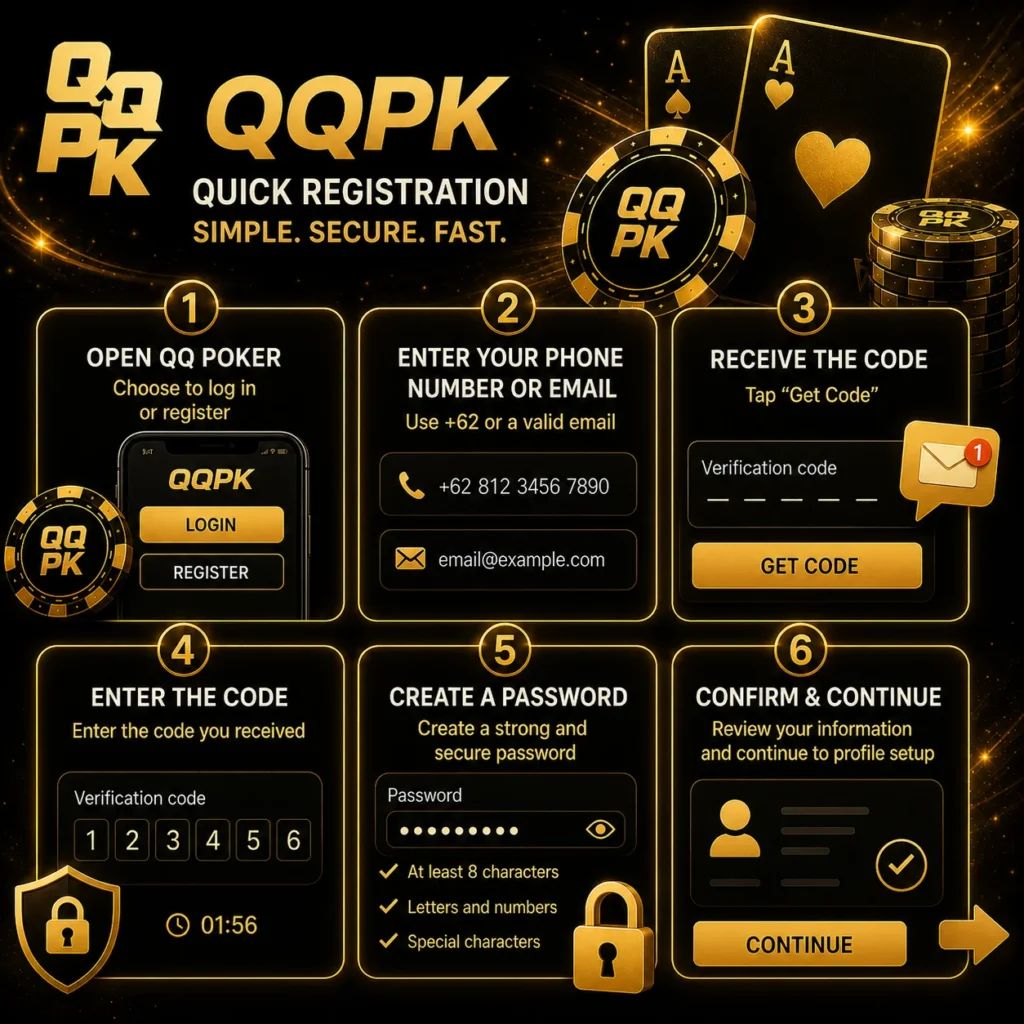
How the QQPoker Login Verification Process Works
Registration and the first sign-in use the same confirmation flow, whether you start in the app or in a browser:
- Open the QQ Poker app or web browser and select the sign-in or registration option;
- Enter your Indonesian phone number with the +62 country code, or a valid email address;
- Tap “Get Code” to receive a one-time verification code via SMS or email;
- Enter the code in the confirmation field within the time window shown on screen;
- Create a secure password that meets the platform’s credential requirements;
- Confirm all entered data is correct, then proceed to the profile setup stage.
A typo in the phone number or email address at step two is the most common reason the code never arrives, so reading it back before hitting confirm saves time. New players completing registration can also check the current QQPoker promo offers before finishing their account setup.
QQPoker KYC Verification After the First Sign-In
Phone or email confirmation opens the account, while identity verification (KYC) can be requested later, for example before a withdrawal or during a security review. Requirements differ by region, account status and verification stage, and there is no single public review time that applies to every account.
Documents and Photo Rules for QQ Poker KYC
Use a valid document from the list shown on your account page, and make sure the name and other identifying fields match your registration details. Upload quality decides most of the outcome:
- capture all four corners of the document, with no glare, shadows, fingers, blur or cropping;
- upload each side as a separate file when both sides are requested;
- provide proof of address only when the system asks for it, within the date range shown on screen;
- complete a selfie or live check only if prompted, in even lighting with your face clearly visible;
- never show a password or two-factor code anywhere in a document image.
Upload files only through the verification area inside the app or on the official site, never through a link from a private message. If a review is rejected, save the message or ticket number before contacting support, as it speeds up the second check.
QQPoker First Login Settings for Language, Currency and Time Zone
The first login is the right moment to set language, display currency, and time zone so the QQ Poker lobby and session logs show what actually makes sense for where you are. The platform’s install guide recommends checking the displayed language, region and currency before signing in, because cashier options and table listings depend on them.
| Setting | Available Options | Recommended for Indonesia |
| Interface language | Bahasa Indonesia, English, Chinese, Thai, Vietnamese, Malay, Portuguese | Bahasa Indonesia or English |
| Display currency | Shown in the app settings for your region | Check it before the first deposit |
| Time zone | UTC+7 (WIB), UTC+8 (WITA), UTC+9 (WIT) | UTC+7 (Jakarta, Surabaya) |
| Notifications | Tournaments, promotions, account alerts | Tournament and promotion alerts |
Save these four settings once and the full poker lobby opens without any further configuration steps.
Game Formats in the QQ Poker Lobby After Sign-In
The lobby groups games by rules first and format second. Stakes, buy-ins and table sizes are shown on each table rather than fixed in advance, and the line-up depends on the schedule at the time:
| Game | How It Plays | Good to Know |
| No Limit Hold’em | Two hole cards plus five community cards | Runs as cash games, MTTs and Sit & Go |
| Pot-Limit Omaha | Four hole cards, exactly two used with three from the board | Check the table rules before joining |
| Short Deck | Cards 2 to 5 removed from the deck | Hand rankings can differ by version |
| All-in or Fold | Every decision is all-in or fold | Short, fast sessions |
| Bomb Pot | Listed in the app lobby | Flow and betting are shown at the table |
Weekend tournaments follow the terms in each announcement, and rapid tables seat you without waiting. If a game is missing from the lobby, update the app, sign in again and check lobby notices, because region, account status and schedule all affect what is available.
QQPoker Login Troubleshooting for Password and Device Errors
QQPoker login stops working for a handful of reasons, most of which players sort out in under two minutes. A wrong password is the number-one culprit, usually tied to switching phones or leaving the account dormant. No code in the inbox typically means a bad prefix or a congested SMS route. Old app builds are a quieter problem: they fail the server check silently and just bounce the sign-in.
Most Common QQ Poker Login Issues and How to Fix Them
Each issue below has a quick fix that works straight from the sign-in screen:
- incorrect password: use “Forgot Password” on the sign-in screen and reset via phone or email;
- verification code not received: confirm the +62 prefix is correct and request a fresh code once the on-screen timer ends;
- email not recognized: check that the address matches the one used at registration exactly;
- app version outdated: update QQ Poker through the official download page;
- browser error: clear cache and cookies, then retry in Chrome or Safari;
- device not recognized: complete the two-step verification prompt and the session opens normally.
Anything that does not resolve through these steps goes to QQ Poker support via the in-app help center, which runs around the clock.

Download and Installation Errors Before Sign-In
Sometimes the problem shows up before the login screen, when the app will not download or install at all. Work through these checks first:
- confirm the connection, free storage, system version and browser download permission;
- reopen the current download page and start the download again;
- avoid unrelated mirror sites that offer the same file;
- if the error repeats, send support the exact warning text, file name and device version.
QQPoker Account Safety After Sign In
Login QQPoker on a shared phone or a public machine and you carry real financial risk if you skip the sign-out. APJII’s 2024 data puts online fraud exposure at 32.5% among Indonesian internet users, which is not a background statistic – it is the environment this account operates in. Mobile data beats open Wi-Fi for accessing QQ Poker outside the home, and two-factor authentication in account settings adds a gate that holds even if the password leaks. Nobody from QQ Poker will ever ask for your password, so any message requesting it is a scam.
Password and Domain Checks Recommended by QQPK
The platform’s security statement adds a few concrete rules that cover most account takeovers:
- build a long password from uppercase letters, lowercase letters and numbers, and update it regularly;
- avoid birthdays, phone numbers and other details that are easy to guess;
- before logging in, compare the domain, page name and certificate, and stop if the page redirects again;
- ignore unsolicited messages from accounts claiming to be support, especially if they ask for codes or wallet details;
- never install tools that promise to show opponents’ cards, since they can steal account and wallet data.
QQPK is run by QQPOKER Technology Limited, whose registration with the Anjouan gaming authority lists the domains qqpk.com and qqpk.poker, and a Gaming Labs certification report is published for the platform. If you spot a login you do not recognize, take a screenshot, save the time and transaction details, change the password, sign out of other devices and keep the case number from support.
Responsible Play Tools on QQPoker
QQPoker is for players aged 18 and over, or 21 where local rules require it, and identity documents can be requested to confirm age. Once you are signed in, several limits can be set on the account:
- deposit limits per day, week or month, where raising a limit takes a 7-day waiting period;
- play-time reminders, with a break of at least 15 minutes suggested after every 1 to 2 hours;
- cooling-off for 24 hours, 7 days or 30 days, which cannot be canceled early;
- self-exclusion through customer service, which deactivates the account and blocks new sign-ups.
Game, deposit and withdrawal history stays available in the app under My, then Account Records, which makes it easier to keep track of time and spending.